> ## Documentation Index
> Fetch the complete documentation index at: https://getlemma.com/docs/llms.txt
> Use this file to discover all available pages before exploring further.
# Own multiple entities
> Link multiple entities to a single login for easy access and instant transfers.
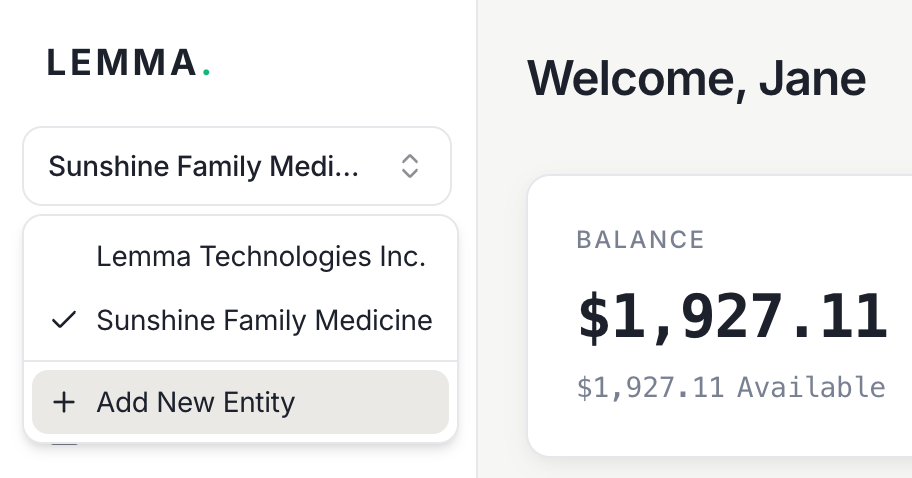
You can manage multiple entities under the same email login. To add a new entity, go to [Add New Entity](https://app.getlemma.com/onboarding/new-application) in the sidebar — no separate email required. Use the entity switcher to move between entities you've created without signing out.
 ## Why link entities
Linking entities to a single login gives you:
* **Instant transfers** — [transfers between your linked entities](/docs/guides/move-money#transfer-within-lemma) are free, instant, and available 24/7
* **One login for everything** — switch between entities without managing separate credentials
* **MSO-PC friendly** — management services organizations and professional corporations can keep finances separate while maintaining easy access to both
## Inviting others to an entity
If you want other people to view or manage an entity, invite them as team members instead of sharing your login. See [Team management](/docs/guides/team-management) for details on inviting users and assigning roles.
## Why link entities
Linking entities to a single login gives you:
* **Instant transfers** — [transfers between your linked entities](/docs/guides/move-money#transfer-within-lemma) are free, instant, and available 24/7
* **One login for everything** — switch between entities without managing separate credentials
* **MSO-PC friendly** — management services organizations and professional corporations can keep finances separate while maintaining easy access to both
## Inviting others to an entity
If you want other people to view or manage an entity, invite them as team members instead of sharing your login. See [Team management](/docs/guides/team-management) for details on inviting users and assigning roles.