

Move money
Percentage cash sweeps
Cash sweeps can now send a percentage of the source account’s available balance. Choose Percentage as the sweep method and enter a percentage between 1% and 99%. For now, cash sweeps can only send to one bank account. Our roadmap includes percentage-based cash sweeps that can split your balance between multiple destinations, such as saying half to bank account A and half to bank account B.APIAccounts
Open bank accounts through the API
The new Open a bank account endpoint lets a platform open a Lemma bank account for an entity and returns its account and routing numbers right away.APICards
Freeze and unfreeze API-issued cards
Update card now takesstatus. Send disabled to freeze a card so every new authorization is declined, and active to unfreeze it with its spending limits and merchant restrictions unchanged.Move money
Recipients get a “You got paid” email
When you send an ACH, wire, RTP, or FedNow payment to an external recipient, Lemma now emails them once the payment is settled. The email names your entity and the amount, and tells them the funds will be available shortly. Lemma sends it only when it has an email address on file for the recipient. See Email notifications.Transactions
Filter claim remittances by received date
On the Payer Remittances page, you can now filter the By claim view by the date each payment was received. This uses the same 835 payment date and inclusive date range as the payer view. A window shows exactly the claims behind the payments listed there, and the totals update to match. A new Received column shows each claim’s payment date in the table and in CSV exports. Use it to check claim-level results against the payer view during reconciliation.Transactions
Attach documents after a transaction posts
You can now add an invoice, receipt, or agreement to a transaction that has already posted, right from the transaction drawer. This covers payments you never filled out a form for, such as a supplier’s ACH debit, an incoming wire, or a check deposit. Add up to ten documents per transaction, and remove any you added. Documents added this way are visible only to your team members who can see that account. They are never shared with the other party. See Attachments.APICards
Merchant category controls for API-issued cards
Create card now takesauthorization_controls.merchant_category_code, so a platform can restrict a card to an allow list of merchant category codes, or decline it at a block list. The new Update card endpoint changes a card’s spending limits or merchant category restriction without reissuing it, and keeps whichever you don’t send.Only an allow list or a block list can be set on a card at a time. Setting one nulls the other.Team
Decline alerts and default-on transaction emails
You can now get an email when Lemma declines an ACH transfer, card payment, or check, alongside the existing money in and money out emails. For new entities, all three are on by default for owners, CFOs, and Accounting members. Existing entities keep their current settings.Accounts
Download the current month’s bank statement
You can now download an interim bank statement which includes all transactions that have posted so far this month. Pending transactions can appear in interim statements in their own Pending section.Accounts
Running balance on bank statements
Bank statements now show your account balance after every transaction in a new Balance column. Each statement starts with an opening balance row and ends with a closing balance row, so you can match any line to your books without adding up transactions by hand. A transaction’s reference now appears on its own line beneath the description.Move moneyTeam
More intuitive approval rules
Approval rules place a hold while waiting for your team to approve or reject the transfer. Now, the transactions table will show meaningful categories like “ACH needs approval” instead of a generic “Hold”. This helps you filter transactions and makes it obvious an action is required.Second, when sending a transfer, users will get a bright orange icon to make it obvious the transfer did not send instantly and needs someone’s approval.Third, an info icon beside your available balance now flags when there’s a hold on your account because of a transfer that’s waiting for approval. Read understanding available balance for more details.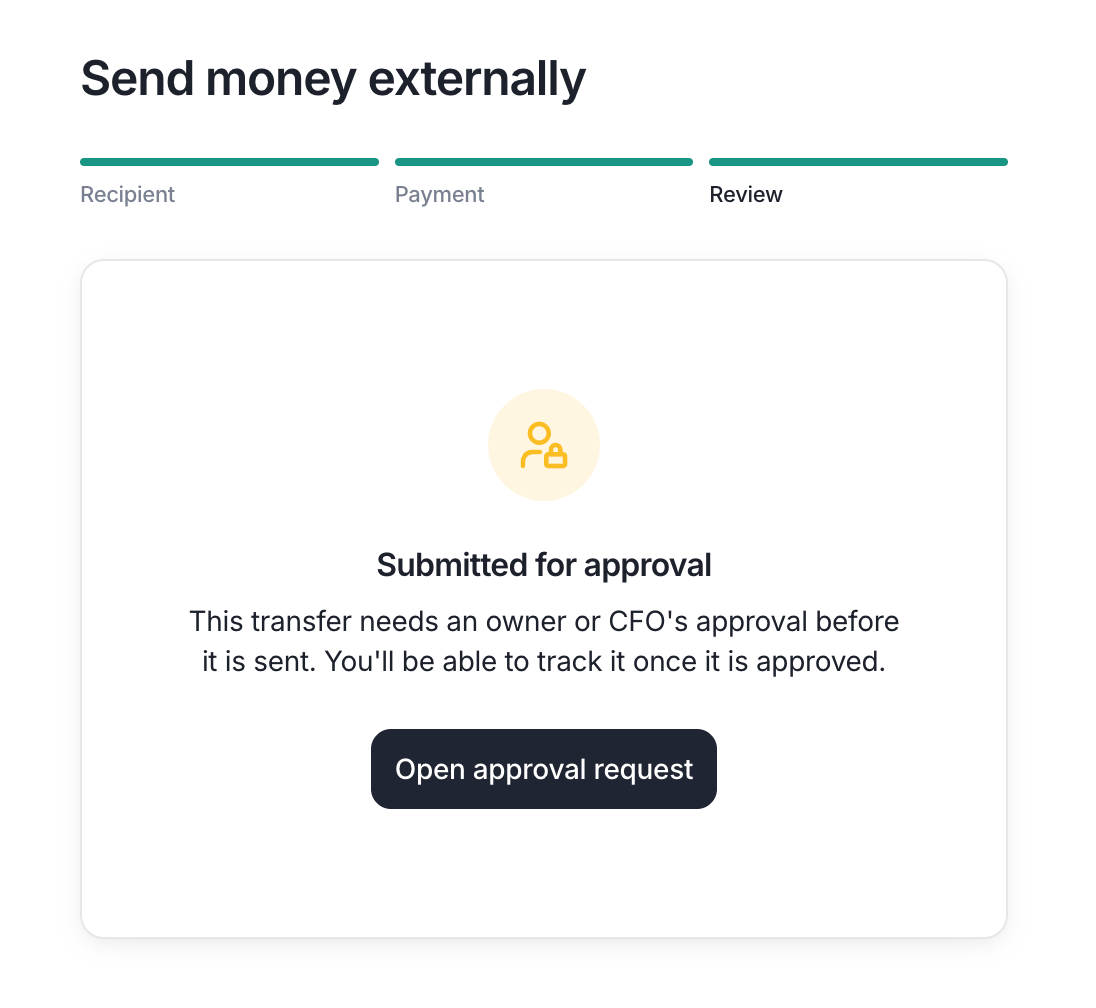
A transfer held for approval. Owners and CFOs will see an option to self-approve.
Team
New CFO banking role
Team members can now be assigned the new CFO banking role. The CFO role has most of the permissions Owners receive except for configuring entity settings, inviting new users, and connecting third party apps. The CFO role can be scoped to specific bank accounts for when you want someone to have full access to your Lemma dashboard while still hiding specific bank accounts. See banking roles for the full permissions list.APILockbox
List and retrieve inbound card payments from the API
Platform partners can now pull a paginated list of inbound card payments and fetch a single inbound card payment through our API. This covers every charge attempt against a payer’s virtual card, including virtual cards paid into a lockbox and cards charged manually from the Lemma dashboard.Transactions
See declined transactions
Declined transactions are now in the transactions page in red, similar to how pending transactions show up with a special label.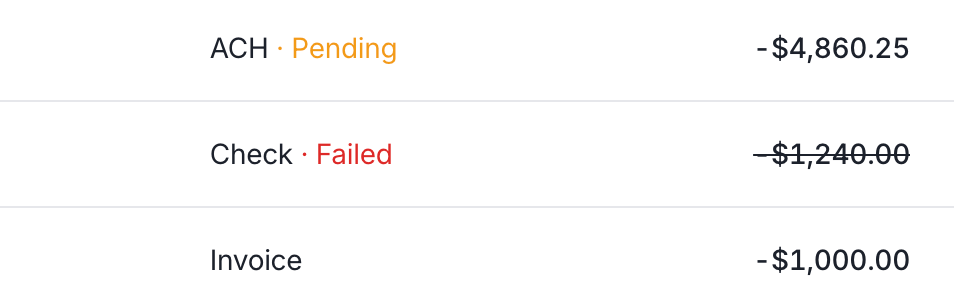
A pending outbound ACH, a failed check withdrawal, and a posted invoice payment in the transaction feed.
Move money
Send money to a saved recipient in one click
Open a recipient from your external recipients list and click Send money at the bottom of the drawer to jump straight to the transfer form with that recipient already selected. See external accounts.API
List outbound ACH transfers from the API
Platform partners can now pull a paginated list of outbound ACH transfers through our API.APITransactions
See why an inbound ACH transfer was returned
Returned inbound ACH transfers now expose araw_return_reason_code on the get inbound ACH transfer and list inbound ACH transfers endpoints. Use it to tell why the receiving bank sent a credit back. See the full list of inbound ACH return reason codes.Move money
Deposit checks up to $300,000
The maximum single-check deposit limit is now $300,000, up from the previous cap. Deposit larger payer checks straight from check deposit or the desktop check scanner without splitting them.Move money
Download a void check with a custom payer
The void check download on an account’s detail page now has a Download with custom payer option next to Void Check. Type up to four lines of name and address, and Lemma prints them verbatim on the voided check PDF when a payer or payroll provider needs the check made out to a different name than the one on file. See account documents.API
Filter remittances by reconciliation status
The list remittances endpoint now returns areconciled boolean on every row, so you can tell which remittances Lemma has matched to their deposit.Team
Skip MFA codes on trusted devices
When you enter a verification code at sign-in, you can now select Remember this device for 7 days. Lemma skips the verification code on that browser for a week; your password is still required every time. See Security settings for details.Onboarding
Sign the Platform Agreement and BAA during onboarding
New entities now review and sign the Lemma Platform Agreement and Business Associate Agreement as their own step in the application, right before review. Each signature is recorded against the person who signed, when they signed, and the agreement version they accepted, so the BAA that covers the health data Lemma ingests is in place before an account opens. See the quickstart for the full onboarding flow.API
Get a remittance’s 835 as JSON
You can now retrieve any remittance as structured JSON with the Get a remittance’s 835 (JSON) endpoint: the payment, payer, payee, every claim with its service lines and adjustments, and the settlement that paid it. It’s a great way to get 835s in a JSON format from any patient management system or clearinghouse. Simply connect your integration to Lemma and we’ll convert the X12 format into JSON.Integrations
Connect Candid Health as a remittance source
You can now connect Candid Health. Paste the API client ID and client secret from your Candid org-admin, and Lemma pulls your remittances into your Payer Remittances feed and reconciles them against your claims.TeamTransactions
Get an email when money moves
You can now get an email each time money moves on one of your accounts. Select the payment types and direction, and set an optional minimum amount so only larger payments reach your inbox. See Email notifications for how these work.Move moneyTransactions
Watch each check in a bulk deposit land
When you deposit a stack of checks through check deposit or the desktop check scanner, the final screen now shows a live status for every check as it deposits. Each check is submitted on its own, so one slow or failed check no longer holds up or fails the rest of the batch. If a check fails, use Retry to resubmit only the failed checks. Retrying is safe: a check that already went through is never deposited twice. Refreshing or leaving the page mid-deposit is fine too; the remaining checks finish automatically when you come back.Move money
Monthly cash sweeps
Cash sweeps can now run monthly instead of only weekly. Choose Monthly when you set the schedule and the rule runs on the first day of each month. Use monthly sweeps to schedule recurring payments between your entities like MSO management fees.Move moneyTransactions
Charge a virtual card yourself
When a payer gives you a virtual card directly, in a payer portal, by fax, or over the phone, you can now charge it yourself from Move money > Charge a card. Enter the amount and the card details, and the funds land in your account in 24 to 36 hours. The charge appears on your Card Processing page alongside the cards Lemma charges from your lockbox. Reach out to Lemma to get self-serve charging enabled, then see the guide.APICards
Cancel a card from the API
Platform partners can now cancel a card they issued through our API. Cancelling takes effect immediately and can’t be undone, so freeze the card instead if the entity only needs to pause spending.Cards
Manage a card after issuing it
Open any card from the cards page and use the... menu at the top-right to manage it:- Update limits. Change the max purchase amount or max total spend, switch a limit off, or add one you skipped.
- Freeze. Instantly block new transactions while preserving the card’s limits and history. Unfreeze any time to resume using the card.
- Cancel. Permanently stop the card. This can’t be undone, so freeze it instead if you only need to pause it temporarily.
Transactions
See why a payer’s check doesn’t match its claims
Payer remittances sourced from an ERA now show a Provider-Level Adjustments section on the detail page. Recoupments, forwarding balances, interest, and capitation each appear with their signed effect on the check, so you can explain a deposit that doesn’t equal the sum of the claim payments. See the reconciliation guide.LockboxTransactions
Track every card payment in one place
Card acquiring now has its own Card Processing page. Every charge attempt against a payer’s virtual card appears in a single ledger, with a status filter, sortable columns, and a detail drawer that walks the payment from the document it came out of through to settlement or chargeback.Onboarding
Archive an application you no longer need
Draft onboarding applications now have an Archive button in the Application Structure dialog. Archive removes the application from the onboarding dashboard and closes it for every collaborator, with a toast letting them know who archived it. Submitted applications are unaffected.Transactions
Answer “where is my check deposit?” from the drawer
The check deposits page now shows a processing timeline when you click on a check. The check deposits page also gained a status filter and pagination, so you can page through history and pull up only the deposits in a given state.Integrations
Connect Stedi as a remittance source
You can now connect Stedi. Enter your credentials, run the built-in connection test, and Lemma will pull your 835 remittances into your Payer Remittances feed. Each remittance now shows its source with the vendor’s logo, so you can tell at a glance where it came from.Onboarding
Invite licensed professional owners at application submit
The review step of a PC, PLLC, or PA application now offers to invite any licensed professional owner who isn’t already a collaborator. Each owner appears with a Yes/No toggle, defaulted to Yes. Leaving it on Yes sends the invite when you submit, and the invite carries over to the entity once the application is approved. See our onboarding collaboration guide for the full collaboration flow.Onboarding
Add an owner without contacting Lemma
Owners can now add another beneficial owner directly from Settings > Profile. The form collects the same details as the onboarding application, so you can add a new principal to your entity without reaching out to us.OnboardingLockbox
NPI is optional during onboarding + edit your NPI from settings
NPI is now optional during onboarding. New professional entities can sign up without an NPI and submit the NPI later from Settings > Profile when they get one.Onboarding
Onboard a Professional Association
Professional Associations (PAs) can now sign up for Lemma alongside PCs and PLLCs. The application asks for the licensed physician who owns the practice and the entity’s NPI, and PAs are covered by the same licensed professional owner protections as other professional entities.LockboxTransactions
APITransactions
Reconcile inbound ACH payments with the raw addenda
Inbound ACH transfers now expose anaddenda field across the get transaction, list transactions, get inbound ACH transfer, and list inbound ACH transfers endpoints.addenda returns the raw freeform addenda lines the payer sent, in transmission order (for example the 835/837 TRN and REF claim-payment segments). To reconcile a healthcare claim payment, match the TRN carried in the addenda against the TRN in your 835 ERA.Transactions
Filter out zero-payment payer remittances
The Payer Remittances page now marks fully written-off remittances (a $0.00 payment) with their own NON state, so they no longer sit in the reconciliation queue as unmatched. Filter by match state to hide them, or pull them up on their own when you need to review write-offs.APICards
Issue debit cards from the API
Platform partners can now issue a virtual debit card with their own spending limits and read it back through our API. Set caps per transaction, per day, per week, per month, or over the card’s lifetime — the most restrictive limit applies.APICards
Display card details in your own app
Fetch a short-lived iframe URL to display a partner-issued card’s number, CVV, and expiration date directly to the account holder. The sensitive values render inside the iframe and never touch your servers, so you can surface a card in your product without taking on PCI scope.APIAccounts
Download settlement instructions from the API
Platform partners can now download a bank account’s settlement instructions as a PDF through our API. Share the file with a payer who needs to send funds to the account by wire or ACH credit. The PDF includes the account and routing numbers, beneficiary name and address, and the receiving bank’s details.Move moneyOnboarding
Checkbooks
You can now order a checkbook for any Lemma account from order checkbooks. Each checkbook includes 150 checks and is mailed directly to you.Move money
Card acquiring is live
When a payer reimburses you by virtual card, Lemma now detects the card in your lockbox mail and charges it for you — no terminal to key the number into, no portal to log into. The money is deposited into your account, with every payment and fee landing on your Transactions page as its own labeled line item: payments as Acquiring, fees as Fee.Read How card payments show up and Chargebacks to get started.Move moneyInvoicingTransactions
Attach documents to transfers and invoices
You can now attach the paperwork behind a payment to the payment itself. Upload an invoice, loan agreement, or management services agreement when you send a transfer or raise an invoice, and it stays on the transaction — so months later the record explains itself instead of prompting a question.- Both sides hold the same document. Attach a file to a transfer between two entities, or to an invoice, and the other entity sees it on their side of the transaction. For MSO-PC groups, that turns an intercompany fee into a documented, arm’s-length record rather than an unexplained transfer.
- Readable before approval. Whoever signs off on a transfer, and whoever decides whether to pay an invoice, can open the attachment while deciding — so the approval is made against the contract, not against a note saying one exists.
- It stays with the money. If a payment is later returned or reversed, the attachment shows on that transaction too, with nothing to re-attach.
- External payments stay private. A document attached to an external transfer is for your records only and is never sent to the recipient.
InvoicingMove money
Invoicing is live
Invoicing is now available on Lemma. Bill another entity for a payment without giving them access to your accounts, or needing access to theirs. Each invoice carries line items that lock once it’s sent, so both sides keep an auditable record of what the payment covers.Today you can send invoices to other entities on Lemma, which is useful if you run an MSO-PC structure: management fees move between the two entities on a documented, arm’s-length record, and the PC’s owner still decides whether to pay.We’re also working on external invoices, so you’ll be able to bill clients who aren’t on Lemma.Move moneyTransactions
Transaction categories overhaul
We shipped several new transaction category features to streamline your bookkeeping easier:- Categorize any transfer as you send it. ACH, wire, RTP, FedNow, and mailed checks join book transfers with an optional category step, so the transaction arrives already filed.
- Categorize pending transactions. No need to wait for settlement, tag a transaction while it’s still pending.
- Lemma transactions categorize themselves. Bank fees, loan disbursements, and deposit bonuses are filed for you, cutting down the bookkeeping you do by hand.
API
Retrieve payer remittances and their 835s from the API
Platform partners can now pull a paginated list of an entity’s remittances and retrieve each one’s 835 electronic remittance advice (ERA) through our API.Each remittance includes the payer, trace number, paid amount, and remittance date. Fetch any remittance’s 835 as raw X12 to post it straight into your billing or EHR system.CardsTransactions
New transactions table on card pages
Card pages now show all of the card’s transactions. Sort by date or amount to find what you’re looking for.Cards
Custom spending limits for debit cards
When issuing a new card, you can now set a max purchase amount and a max total spend limit that resets daily, weekly, or monthly.Move moneyTransactions
Set a category when sending a book transfer
You can now choose a transaction category while sending a book transfer — it’s applied to the created transaction automatically, so you don’t need to open the transactions page later to categorize it.TeamOnboarding
Licensed professional owner protections
When you onboard a PC or PLLC, you now identify the licensed physician who owns the practice as part of your application. Once recorded, that person keeps guaranteed control of the entity’s money, which helps your practice meet corporate practice of medicine laws:- They can approve their own transfers and cash sweep changes, even when your approval rules would otherwise require another team member to sign off.
- No one can remove them or reduce their access, not even the physician themselves.
Transactions
Create your own transaction categories
You can now add custom transaction categories from Transaction Category settings. Rename a custom category any time, and archive it once you’re done with it. Archived categories stay attached to transactions they already tagged, but are hidden from the list when categorizing new ones.API
List inbound ACH transfers and check deposits from the API
Platform partners can now pull paginated lists of inbound ACH transfers and check deposits through our API.Both endpoints return newest results first and accept an optional account filter, so you can reconcile a single account or sweep across every account you can access. Listing inbound ACH transfers is the fastest way to find deposits from payers, such as payments from an insurance company.Team
Customize your notification emails
Each person can now choose which notification emails they receive, including transfer approval requests and microdeposit alerts. Previously these always sent; now you decide what lands in your inbox from your notification settings.API
Fetch transfer details from the API
Platform partners can now retrieve the details of a book transfer or an ACH transfer through our API. This is particularly useful for ACH transfers, which can take several hours to process, so you can see when one transitions from a pending to a submitted state.Move money
Per-rail approval rules
You can now tailor approval rules to each payment rail. Set different requirements for ACH, wires, check mailing, and more. For example, require owner approval for small patient refunds you are sending as a check, but allow larger ACHs to go through without review.Move money
Approval rules for transfers
Add a layer of oversight to outgoing money. With approval rules turned on, a transfer must be approved by an owner before it’s sent.Move money
Attach a document when mailing a check
You can now upload a PDF to include with any check you mail — useful for sending an itemized statement alongside a patient refund. The document is printed in black and white and mailed in the same envelope as the check.Accounts
Balance history
View your account balance over time with the new balance history chart on the home page and dedicated account pages. Choose from four lookback periods — 1 month, 3 months, 1 year, or year-to-date — to zoom in on the time range that matters.Transactions
Transaction categories
Categorize any transaction directly from the detail panel. A category column is included in every CSV export.For MSOs, categories like MSO Fees and MSO Loan Repayment create an audit trail that keeps fee and loan flows legally distinct. See the full list of categories.Onboarding
Email when microdeposits arrive
Payroll companies often send small deposits when you’re linking a new bank account and asks you to confirm the amounts to prove account ownership.You’ll now receive an email the moment those deposits land, so you can finish verification without constantly checking your Lemma transactions.TransactionsDashboard
Filter, sort, and export on Payer Remittances
The Payer Remittances now supports filtering and sorting your data. Filters are saved to your URL so you can bookmark the page or share a link with a coworker.Transactions
Click-to-copy on transaction details
Clicking transaction metadata will automatically copy it — useful for billing teams who regularly copy trace numbers.Transactions
ACH addenda surfaced
The free-text addenda field that payers and senders include with an ACH transfer is now shown in the transaction details. The addenda is useful for billing teams to match payments to invoices.Onboarding
Type dates directly into calendar pickers
Every date input in the dashboard now lets you type in case you want to skip using a mouse to select a date on the calendar.Lockbox
Inline notes on lockbox items
Leave a note on any item in your lockbox feed without leaving the page. Notes are useful for flagging items that need follow-up (“call payer”), recording which payments were posted to your EHR, and any other billing team workflow.DashboardOnboarding
Unified entity switcher
The entity switcher in the top-left now shows everything that’s relevant to your account in one place:- Active entities you already manage
- Pending applications that haven’t finished onboarding
- Invitations from practices that have added you as a collaborator
IntegrationsTransactions
Export transactions to QuickBooks
Export your Lemma transactions as a.qbo file and import them straight into QuickBooks. Exports respect any active filters on the transactions page, so you can pull a single account, date range, or category.Onboarding
Collaborative application
Fill out your Lemma account application alongside coworkers in real time. Each person can enter the sections they’re responsible for — like beneficial owner details — without sharing sensitive personal information. Sensitive fields like Social Security numbers open in a private popup and are encrypted immediately, invisible to other collaborators. Learn more about collaborating on an application.Accounts
Hide account and routing numbers by default
Account and routing numbers on the accounts page are now redacted by default and only shown when you click to reveal them. This reduces incidental exposure during screen shares and demos.Move money
Mail checks for vendor payments
Our dashboard lets you mail checks to vendors directly, eliminating trips to the post office and making it easy to handle payments like government fees.Move money
Disable sweeps to keep them as drafts
Collaborate on cash sweeps by disabling them and continuing to edit them until you’re ready to turn them on. All cash sweeps are active by default when published but you can disable them from the cash sweeps page to stop them from running until you’re ready.AccountsCards
Recent transactions in the accounts and card detail pages
The card and bank account pages now list recent transactions right alongside the account info, so you can quickly find what you need without jumping over to the main transactions page.Move money
Mobile check deposits
Deposit paper checks from your phone on the move money page of the dashboard. Snap a photo of the front and back and funds are credited to your account once the check clears. A live viewfinder with edge detection helps you capture a clean image on the first try. Depositing from a desktop works too — upload a photo of the front and back of the check instead of capturing one with the camera.Move money
Cash sweeps
Set up automated transfers that run on a recurring schedule. Define rules for each sweep — including the amount, destination, days of the week, and time of day — so money is always where it needs to be without manual intervention.Dashboard
Dedicated entity links
Each entity now has its own URL so you can keep a tab open for each one you control. The URLs look likeapp.getlemma.com/entity_123 and app.getlemma.com/entity_456. This is important for MSO-PC structures where one individual may own multiple entities and wants to bookmark direct links to specific dashboards. Read our docs to learn how to link different entities.Transactions
Hold release dates
Check deposits now show when the hold is expected to release. This is visible on the transaction detail panel in the dashboard and in the API available to our partners.Onboarding
Payer update concierge
Our concierge team will update your banking information with payers. Visit the accounts page to request a call.Move money
Instant payments
Send money instantly with two new payment rails: Real-Time Payments (RTP) and FedNow. Both are free, settle in seconds, and are available from the send externally page. Each transfer validates the recipient’s routing number to confirm the bank supports instant payments before you send.Integrations
Plaid integration
Your Lemma accounts are now available through Plaid. Connect Plaid-powered apps like Venmo, QuickBooks, and other accounting software to see your Lemma balances and transactions alongside your other financial accounts.Cards
Self-serve debit cards
Issue virtual and physical debit cards on your own — no need to contact our team. Create as many virtual cards as you need. Physical cards are limited to one per person, per entity.Transactions
CSV transaction export
Export transactions to CSV directly from the transactions page. Exports respect any active filters, so you can pull exactly the transactions you need for reconciliation or accounting.Dashboard
Referral program
Refer another entity to Lemma and you’ll each receive $250 when they get their first patient or insurance payment!Cards
Foreign currency
Card transactions made in a foreign currency now show the original presentment amount alongside the settled total.Team
Multi-factor authentication
Secure your account with authenticator apps or SMS verification. Setup takes under a minute.Cards
Card spending controls
Set per-transaction spending limits on card transactions. Transactions that exceed your policy are declined at the point of sale.Move money
Check mailing
Send physical checks directly from Lemma. Enter a recipient, amount, and mailing address. Lemma prints and mails the check with your practice’s name and address as the payer. Useful for vendors that don’t accept electronic payments.Accounts
Account verification letters
Generate and download official account verification letters issued by our banking partners. Useful for credentialing, payer enrollment, or proving account ownership to third parties.Void check downloads
Download a void check PDF for any account. Helpful when a payer or payroll provider requires a voided check to set up ACH deposits.Transactions
Real-time transactions
Posted transactions now appear within 5 seconds, down from an average of 30 seconds.Accounts
Settlement instruction PDFs
Download settlement instruction documents for any account. Settlement instructions include your account’s routing number, account number, and payee details. Hand these to payers or billing companies to route payments correctly.Move money
Cross-entity internal transfers
Move funds between any of your Lemma accounts instantly, including across different legal entities. Ideal for MSO structures where a management company needs to allocate funds to individual entity accounts. The transfer form shows full entity context on the review step so you always know where money is going.Team