

Billing between two entities requires the Multi-Entity plan or above. See
pricing.
Start with manual invoices
For the first month or two, send each management fee as a manual invoice rather than putting it on a schedule. Early on the fee is rarely the same twice. Collections move, pass-through costs land in the wrong month, and the split you agreed to on paper meets its first real billing cycle. A manual invoice lets you bill the number that is actually right, attach the calculation behind it, and correct course before anything is automated. It also builds the record. Every invoice carries locked line items, its own invoice number, and the PC owner’s approval, so by the time you automate you have two or three months of documented, arm’s-length transactions rather than a recurring transfer with nothing behind it. Once the fee settles into a predictable amount, move it onto a cash sweep so it runs on schedule. Sweeps are the right tool for a stable, recurring fee; they are the wrong tool for a number you are still working out.Send the invoice from the MSO
Go to Invoicing from the MSO. Sending an invoice requires Accounting, CFO, or Owner banking permissions.1
Choose the PC you are billing
Select the PC as the recipient. Invoice contacts
covers the full rules on who you can bill.
2
Break the fee into line items
Give each component of the fee its own description and amount. Line items
must sum to the invoice total, and they lock once the invoice is sent, so
the record cannot be altered afterward. An itemized bill is what turns a
management fee from a lump sum into something the PC’s owner can actually
evaluate.
3
Attach the agreement
Add up to ten attachments, starting with the
management services agreement the fee is calculated under. A cross-entity
attachment is visible to both entities, so the MSO and the PC read the same
document rather than each holding a private version.
4
Send it
Lemma emails the PC’s owners with the invoice PDF attached and a link to the
page where they can pay it.
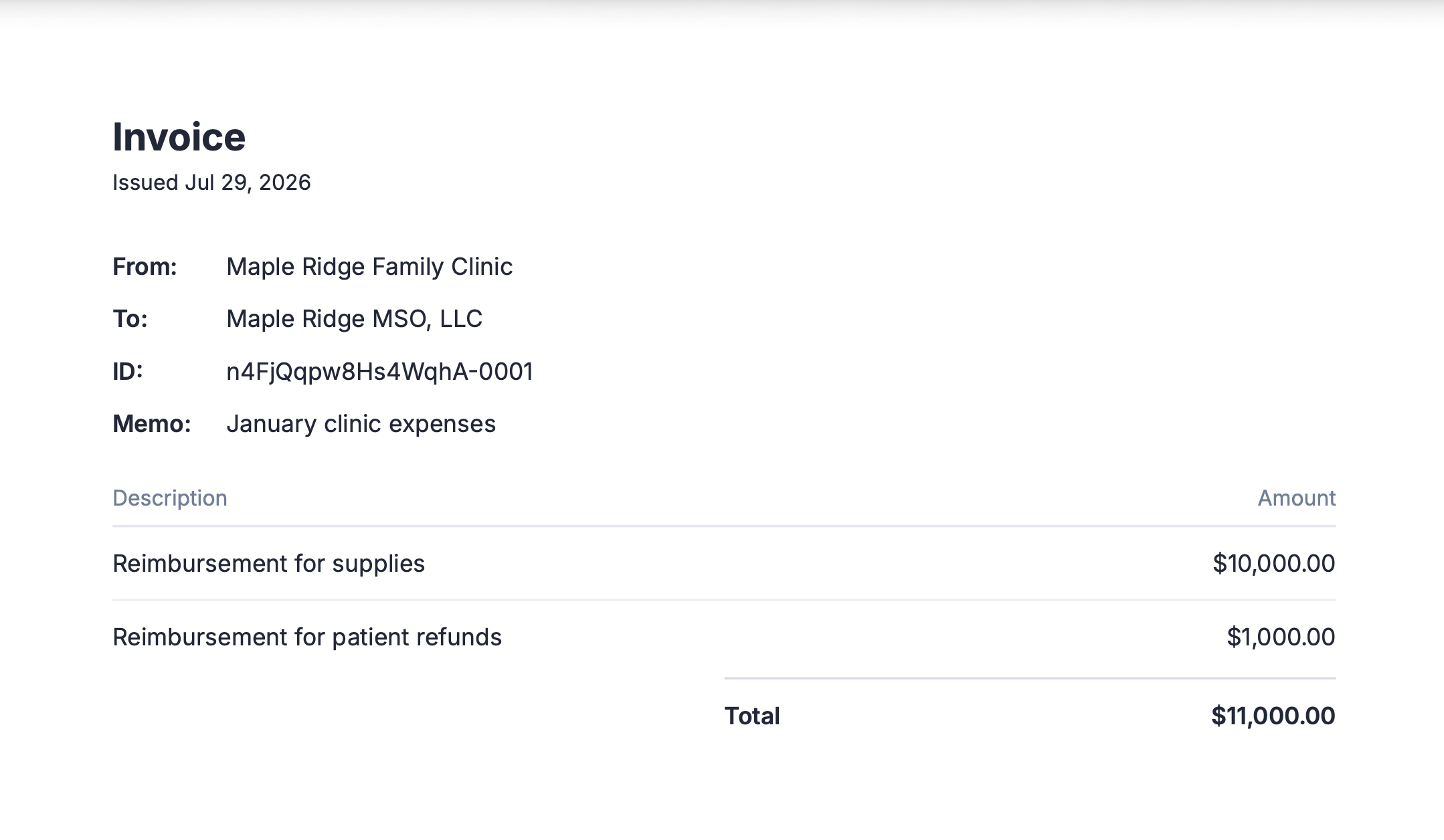
An example invoice sent from Lemma.
Approve and pay from the PC
Only an owner of the PC can pay an invoice. Other members can see the request, but the payment cannot be sent until an owner approves it. This is the point of the workflow: the physician owner decides whether the MSO gets paid, rather than the MSO moving the money itself.1
Open the request
Go to Move Money > Requests and select the pending invoice. A badge on Move Money in the sidebar shows how many requests are waiting. You will see who sent it, the amount, the line items, and any attachments.
2
Read the attachment before approving
Open the management services agreement attached to the invoice and check the fee against it. Approving against the agreement, rather than on trust, is what puts a documented basis behind the payment.
3
Choose the account to pay from
Select the bank account the payment comes out of.
4
Approve or reject
Approving sends the payment instantly, 24/7, including weekends and holidays. Rejecting cannot be undone, and the MSO would need to send a new invoice.
Find the record afterward
Both entities keep their own copy of the record.- The transaction: the payment appears on the Transactions page for both entities. Filter by method Invoices, then open one to download a receipt.
- The approval: the approved transfers page lists every payment the PC approved, including who approved it and when. Use this when you need to show who authorized a fee, not just that it went out.
Correct a mistake
A sent invoice cannot be edited, because its line items are locked. While the invoice is still Sent, the MSO can open it and click Cancel invoice to withdraw it, then send a replacement with the correct details. That leaves both the withdrawn invoice and its replacement on the record, which is what you want for an auditable trail. Once the PC’s owner has approved the payment, the invoice is Paid and cannot be canceled.Automate once the fee is stable
When the amount stops changing month to month, move it onto a cash sweep so the fee transfers on a fixed schedule instead of being invoiced and chased. Two things to keep in mind when you make that switch:- The PC keeps control. Where approval rules are active, creating or editing a sweep needs an owner’s approval, and the physician owner can always see a sweep and stop it. That authority cannot be delegated away.
- You lose the per-payment approval. A sweep moves money without the owner reviewing each transfer, so keep the attachments on the transactions doing the work that the invoice used to do.
Next steps
Invoices
How invoices work between two entities.
Cash sweeps
Put a stable recurring fee on a schedule.
Approval rules
Require sign-off above a threshold you set.
MSO-PC compliance
The guardrails behind the intercompany fee.