

Set or clear a nickname
Members who can manage entity settings can set a nickname.1
Open Profile settings
Go to Settings > Profile for the entity you want to customize.
2
Edit the nickname
In Business Information, select Edit next to Nickname, enter the
name you want to see, and select Save.
Allowed characters
A nickname can be up to 100 characters and can contain:- Letters and numbers
- Spaces
.,-,_,#,+,&, and/
How a nickname looks
Lemma shows the nickname wherever your entity’s name appears. If your entity also has a DBA on file, your team sees the nickname instead of the DBA. On invoices and approval requests, a nickname has a dotted underline. Hover over it to see the legal name, and the DBA if there is one.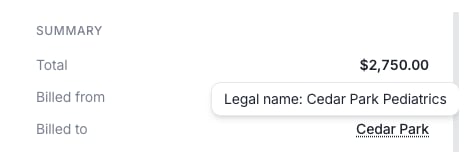
Hover over a dotted-underlined nickname to see the legal name.
Who sees your nickname
Only people in your entity’s organization see the nickname. Everyone else sees the legal name. You are in an entity’s organization if you are a member of at least one entity in that organization, so belonging to any one entity is enough. This also applies to invoices and transfers between Lemma entities. Each person sees the nickname only if they are in that entity’s organization, and sees the legal name otherwise. Invoices always record the legal name.Nicknames and external transfers
A nickname is not included in external transfers. ACH transfers, wires, and mailed checks always use your entity’s legal name.A nickname only changes what you see in Lemma. It is not a registered trade
name or a DBA (“doing business as”), and it does not change your legal name
anywhere else.